
Aftermarket TPMS Sensor Not Working on Toyota Tacoma Fix
If your aftermarket TPMS sensor is not working on your Toyota Tacoma, start with tire pressure, then move to sensor compatibility and ID registration. The truck must receive a valid signal from each sensor, recognize the sensor ID, and compare pressure against the correct cold tire-pressure setting. A reset can help after pressure service, but it will not magically add a brand-new sensor ID to the system.
Quick Answer
An aftermarket TPMS sensor usually fails on a Toyota Tacoma because the sensor has the wrong frequency or protocol, the ID has not been cloned or registered, the tire pressure is wrong, the valve stem leaks, or the sensor was damaged during installation. Check cold pressure first, then scan each sensor ID.
Key Takeaways
- Set every tire to the cold pressure on the driver-door placard before you reset or relearn the TPMS.
- Do not assume every Tacoma uses the same sensor part number. Confirm your model year, market, frequency, protocol, and valve style.
- A TPMS reset stores the pressure baseline. It does not always register new sensor IDs.
- Use a TPMS scan tool to confirm each sensor wakes up, transmits pressure, and displays a readable ID.
- If the tire-pressure light flashes for about one minute and then stays on, treat it as a system fault and scan the sensors.
At a Glance
| Time Required | 10 minutes for pressure checks; 30-60 minutes if sensor scanning, programming, cloning, or ID registration is needed |
| Difficulty | Easy for pressure checks; moderate to professional for programming, cloning, OBD registration, or tire dismounting |
| Tools Needed | Accurate tire-pressure gauge, air source, Tacoma owner’s manual, TPMS scan/programming tool, and OBD-capable TPMS tool when ID registration is required |
| Cost | Free if pressure or initialization solves it; shop cost varies if sensors need programming, cloning, registration, replacement, seals, or tire dismounting |
Understanding TPMS: What You Need to Know

The Tire Pressure Monitoring System, or TPMS, warns you when tire pressure drops far enough to create a safety concern. In the United States, TPMS requirements are part of 49 CFR 571.138, Federal Motor Vehicle Safety Standard No. 138. The standard also explains that a TPMS malfunction indicator may flash for about one minute and then stay on when the system detects a fault.
Most Tacoma TPMS problems after an aftermarket sensor install come from communication or registration, not tire pressure alone. Your truck needs to receive a valid radio signal, recognize the sensor ID, and compare the reading against the correct pressure baseline.
Some vehicles use indirect TPMS that estimates low pressure from wheel-speed changes. Many Tacomas use direct TPMS sensors mounted at the wheel, which means each sensor sends its own ID and pressure data. For example, ATEQ lists the 2005-2020 Toyota Tacoma as a direct TPMS application with 315 MHz sensors. Still, you should confirm your exact year, market, and sensor part number before buying replacements.
Note: Tacoma TPMS details can vary by model year, trim, market, wheel setup, and sensor part number. Always confirm the correct sensor through your owner’s manual, a Toyota parts lookup, a TPMS catalog, or a shop-grade TPMS scan tool.
[Products Worth Considering]
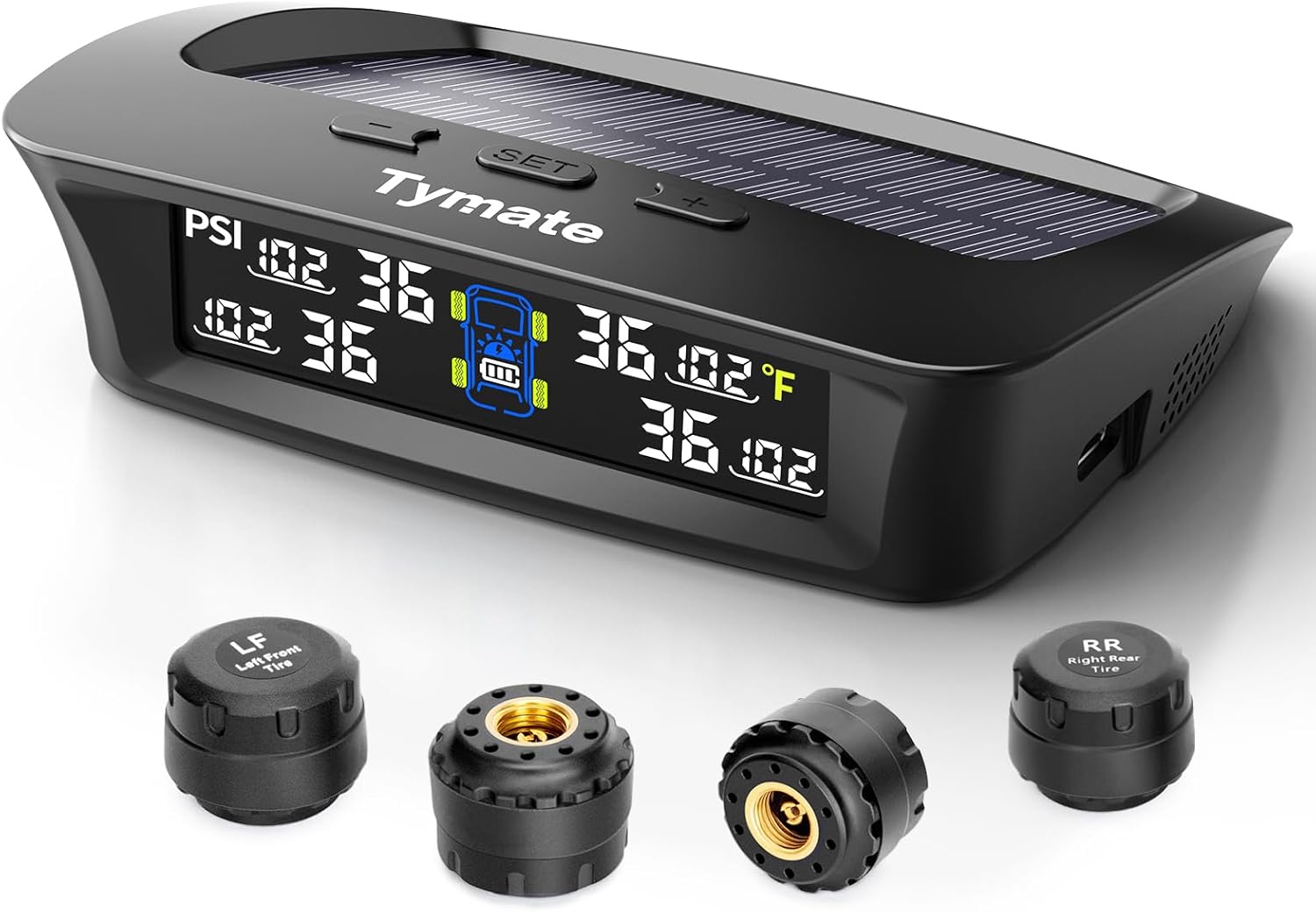
The Tymate TM3 RV TPMS delivers real-time tire pressure monitoring from 0 to 144 PSI with accurate readings and dependable wireless communication. It includes four external sensors with pre-pairing, six alarm modes for rapid leak, pressure extremes, temperature, and signal loss, plus an easy-reference setup for alert thresholds. Solar and USB-C charging help keep the display powered, while the color LCD and adaptive backlight improve visibility for safer driving and towing.

This multi-function tire valve stem removal tool set makes it fast to remove, install, bleed, and clean valve cores for easier tire maintenance. It includes valve core removers, a 4-way spool tool, replacement valve caps, and spare cores to handle replacements and repairs with confidence. Universal compatibility suits cars, trucks, motorcycles, bicycles, and more for roadside convenience.
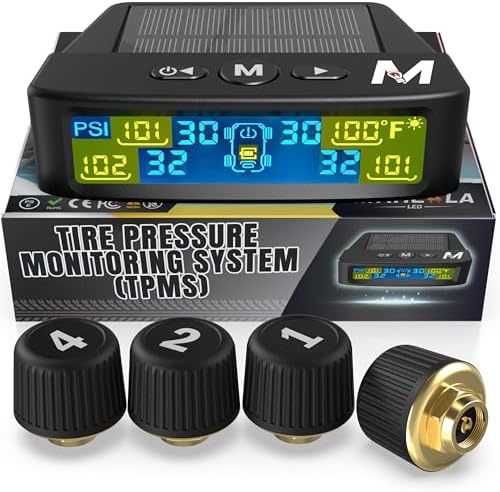
Marcala’s TPMS set of four sensors helps you monitor tire pressure and temperature in real time while driving, with updates every second. The bright color LCD uses auto-dimming for easy viewing, powered by dual solar and USB charging, and offers six alarm modes. Built for trailers, RVs, campers, trucks, and towing setups, the sensors support monitoring 1-4 wheels up to 98 PSI with IP67 waterproof protection.
Before You Buy or Install a Tacoma TPMS Sensor
The cheapest fix is often prevention. A sensor can fit through the valve hole and still fail if it does not match the truck’s electronics or the wheel hardware.
- Confirm the model year and market: A U.S.-market Tacoma may not use the same sensor as a Tacoma built for another market.
- Match the OEM part number or verified cross-reference: Do not rely only on a listing that says “fits Toyota.”
- Check frequency and protocol: Many aftermarket TPMS sensors support 315 MHz and 433 MHz, but they still must be programmed to the correct application.
- Confirm sensor style: Choose the correct rubber snap-in or metal clamp-in valve style for your wheel.
- Check tool support: Make sure your TPMS tool can program, clone, or register the sensor brand you bought.
- Plan for all wheel sets: If you use winter wheels or off-road wheels, each set needs compatible, working sensors.
Warning: Do not buy more sensors until you know whether your current issue is pressure, frequency, programming, ID registration, valve leakage, or a dead sensor battery. A scan can save you from replacing good parts.
How to Check Compatibility of Your Aftermarket TPMS Sensors
Compatibility is the first technical check when aftermarket TPMS sensors will not connect. A sensor can be new, pre-programmed, and physically installed, yet still fail if the truck cannot understand its signal.
Sensor ID Matching
Each direct TPMS sensor broadcasts a unique ID. Your Tacoma must either already know that ID, learn it through a registration process, or receive a cloned ID that matches the old sensor. If the truck is still looking for the original sensor IDs, the TPMS light may stay on even when all tires are properly inflated.
Use a TPMS scanner to read each aftermarket sensor before you repeat any reset. Confirm that every sensor wakes up, shows pressure, shows battery status if supported, and displays a readable ID. If one wheel does not respond, the issue may be the sensor, the battery, the installation, or the scan-tool setting.
Frequency Compatibility Check
Do not rely on a universal “Tacoma frequency” statement. TPMS sensors commonly use 315 MHz or 433 MHz depending on vehicle market and application. Some programmable aftermarket sensors, such as Schrader’s EZ-sensor line, combine 314.9, 315, and 433 MHz applications into one programmable sensor, but the sensor still needs the correct vehicle setup.
Check compatibility in this order:
- Model year and market: Confirm whether your Tacoma was built for the U.S., Canada, or another market.
- Sensor part number: Match the replacement sensor to the OEM number or a verified aftermarket cross-reference.
- Scan-tool setting: Set the tool to the correct Toyota Tacoma year, trim, and sensor type.
- Sensor type: Confirm whether the sensor is direct-fit, pre-programmed, programmable, cloneable, or blank.
- OBD support: Check whether your Tacoma needs OBD registration through the diagnostic port after sensor IDs are read.
Valve Stem and Wheel Fitment
A sensor must also fit the wheel correctly. Check the valve-stem style, nut torque requirements, grommet condition, wheel clearance, and sensor angle. A sensor installed at the wrong angle can leak, break during tire mounting, or fail to transmit properly.
If you use aftermarket wheels, confirm that the wheel accepts the Tacoma-compatible sensor style. Some wheels need a different valve stem, seal kit, or sensor angle to seat correctly. Replace seals and service parts when the sensor maker recommends it, especially after tire removal.
Relearn Method
The relearn method matters as much as the sensor. Some replacement sensors are cloned to copy the old IDs. Others need ID registration with a scan tool or Toyota-compatible software. A reset button or dash menu may initialize the tire pressure baseline, but it may not register brand-new sensor IDs.
Use the Toyota owner’s manual portal to check your model-year procedure, then match your scan-tool steps to that procedure. Newer Tacomas may use a menu-based tire pressure warning system setup, while older models may use a physical reset button.
Programming vs. Cloning vs. Registration vs. Initialization
TPMS terms sound similar, but they do different jobs. Mixing them up is one of the most common reasons an aftermarket sensor still does not work after installation.
| Term | What It Means | When You Need It |
|---|---|---|
| Programming | Writing Tacoma-specific data to a blank universal sensor | When the sensor ships blank or supports multiple vehicles |
| Cloning | Copying the old sensor ID into the new sensor | When you want the truck to see the same IDs it already knows |
| Registration | Saving new sensor IDs into the Tacoma’s TPMS ECU | When new sensor IDs replace the old IDs |
| Initialization | Storing the current tire pressures as the reference point | After pressures are set correctly and sensor IDs are already handled |
A reset is not the same as sensor registration. If your Tacoma cannot see the new sensor ID, the warning light can stay on even when tire pressure is correct.
Common Reasons Your Aftermarket TPMS Sensors May Fail
Aftermarket TPMS sensors can work well, but small setup errors can keep your Tacoma from reading them. Use this list to narrow the problem before replacing parts.
- Wrong frequency or protocol: The sensor may not match your Tacoma’s model year, market, or TPMS receiver.
- Unregistered sensor IDs: The truck may still be searching for the old sensors.
- Universal sensor not programmed: Some universal sensors ship blank and must be programmed before installation.
- Incorrect scan-tool selection: Choosing the wrong Tacoma year or Toyota profile can create bad sensor data.
- Low tire pressure: The warning light may be correct if one or more tires are below placard pressure.
- Dead or weak sensor battery: Internal TPMS batteries are usually sealed, so a dead sensor often needs replacement.
- Installation damage: Tire mounting can crack the sensor body, damage the valve stem, or pinch the seal.
- Air leak at the valve stem: A slow leak can trigger the light even when the electronics are fine.
- Aftermarket wheel mismatch: The wheel may need a different stem, seal, or sensor angle.
- Spare or second wheel-set mismatch: Winter wheels, off-road wheels, or a spare sensor can confuse the system if IDs are missing or not registered.
Easy Steps to Program Your TPMS Sensors
Programming can mean different things depending on the sensor. A programmable universal sensor may need vehicle data written to it before installation. A cloneable sensor may copy the old sensor ID. A direct replacement sensor may need its new ID registered to the truck.
Follow this safe order:
- Check tire pressure first: Set all tires to the cold pressure on the driver-door placard.
- Scan the old sensors if possible: Record the IDs before removing them, especially if you plan to clone sensors.
- Program universal sensors before installation: Use a TPMS tool set to the correct Toyota Tacoma model year.
- Install sensors carefully: Use new seals or service kits when required, and follow the sensor maker’s torque instructions.
- Register or clone IDs: Use the correct TPMS tool or Toyota-compatible system so the truck recognizes each sensor.
- Initialize the pressure baseline: Use the reset button or menu only after pressures are correct and IDs are handled.
- Drive as instructed: Follow your owner’s manual or scan-tool procedure so the system can confirm the signal.
- Re-scan if the light returns: Check each wheel for ID, pressure, temperature, and battery status if your tool supports those readings.
Pro Tip: If you still have the original sensors, clone their IDs to compatible replacement sensors when possible. That can reduce relearn problems because the truck sees the same IDs it already knows.
Post-Install Verification Checklist
After the sensors are installed, do not judge the repair only by whether the warning light turns off once. Verify that the system is stable.
- Scan all sensor IDs: Confirm every wheel responds and shows a unique readable ID.
- Compare pressure readings: Match the scan-tool pressure to a trusted tire gauge.
- Check wheel positions: Make sure the displayed position matches the actual tire location if your Tacoma shows individual pressures.
- Inspect for leaks: Use soapy water around each valve stem if pressure drops after installation.
- Drive and recheck: Follow the tool or manual procedure, then verify that the light stays off after another startup.
- Save the IDs: Keep a note of each sensor ID, wheel position, and install date for future rotations or wheel swaps.
How to Troubleshoot Persistent TPMS Warning Lights

A persistent TPMS warning light means the system still sees low pressure or a fault. The light pattern can help you decide what to do next. Toyota’s 2024 Tacoma quick reference also says that if the tire-pressure indicator flashes for about one minute and then remains on, you should take the vehicle to a Toyota dealer.
| What You See | Likely Cause | What To Do |
|---|---|---|
| Light comes on solid | Low tire pressure, slow leak, or pressure baseline issue | Check cold pressure with a gauge, inflate to placard pressure, inspect for leaks, then initialize if needed |
| Light flashes, then stays on | TPMS malfunction, missing signal, dead sensor, wrong sensor, or unregistered ID | Scan each sensor and verify ID registration before replacing more parts |
| Light returns after driving | Slow leak, weak sensor battery, wrong ID, or failed relearn | Recheck pressure, inspect valve stems, and scan sensor status |
| One sensor does not respond | Dead battery, wrong sensor, damaged sensor, or tool set to the wrong vehicle | Confirm the tool profile, then replace or reprogram that sensor after checking compatibility |
| Pressure display shows dashes | Truck has not received valid sensor data yet | Drive as instructed, then scan IDs if the display does not populate |
If the warning light persists after these checks, visit a tire shop that can read live TPMS data. Ask them to show the sensor IDs, wheel positions, pressure readings, battery status, and TPMS fault codes.
Correct Tire Pressure: Why It Matters Before Resetting
Before resetting your TPMS, set every tire to the manufacturer’s recommended cold pressure. For most drivers, that means the tire placard on the driver-door jamb, not the maximum pressure printed on the tire sidewall. NHTSA’s tire safety guidance also points drivers to the vehicle placard and owner’s manual for correct inflation information at NHTSA.gov/equipment/tires.
Correct pressure helps your Tacoma steer, brake, carry weight, and wear tires evenly. Under-inflation can increase heat and tire wear. Over-inflation can reduce ride comfort and cause uneven wear. Both can confuse troubleshooting because the TPMS light may be reporting a real pressure problem.
Check pressure when the tires are cold. Michelin recommends checking before driving or at least three hours after driving, then comparing the reading with the driver-door sticker or owner’s manual at Michelin’s tire pressure guide.
[Products Worth Considering]
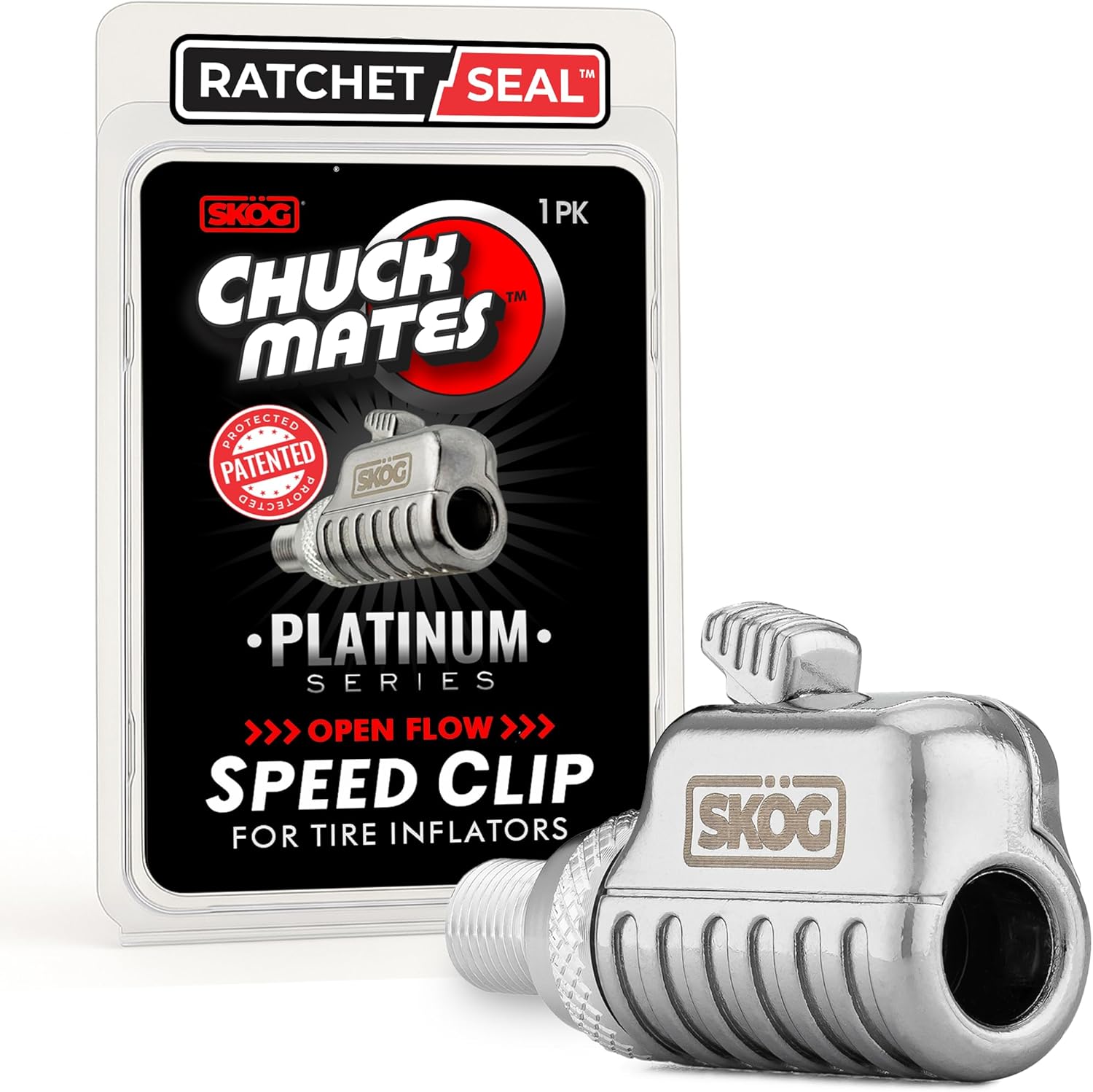
The SKÖG Chuck Mates Platinum uses a patented RatchetSeal push-to-connect system for instant, secure, air-tight attachment to standard tire valve stems. It features an easy push-button release for quick disconnects, plus 360° swivel open-flow airflow to keep operation smooth and kink-free. Universal Schrader compatibility makes it ideal for cars, bikes, motorcycles, RVs, trucks, and more.

The AstroAI 2 pack air chucks provide a heavy-duty, closed-flow locking design that helps keep air flowing during inflation while securely attaching to the valve stem. Built with 250 PSI rated brass components and compatible with Schrader valves, they feature 1/4" female NPT threads for a wide fit with common inflators. The straight tip and locking clip make filling tires and monitoring pressure more convenient.
When and How to Use the TPMS Reset Button
You should use the TPMS reset button or dash-menu initialization only after the tire pressures are correct. Use it after adjusting pressure, correcting a low-pressure warning, or completing tire service when your owner’s manual calls for initialization. Do not use it as a substitute for registering new sensor IDs.
When To Use the Reset Button
Use the reset button when you need the truck to store the current tire pressures as the reference point. That usually happens after you adjust pressures to the placard setting or after tire service.
- Verify tire pressures: Use a reliable gauge on cold tires.
- Confirm sensor IDs are handled: If you installed new sensors, make sure they are cloned or registered first.
- Initialize the system: Follow the exact Tacoma owner’s manual procedure for your model year.
If the light stays on after initialization, stop repeating the reset. A repeated warning usually means the system still sees a pressure issue, a sensor issue, or an ID registration problem.
How To Reset TPMS
The exact process can vary by Tacoma model year, so use your owner’s manual as the final authority. The 2024 Tacoma Quick Reference Guide shows a menu-based setup through the Multi-Information Display, including a “Setting Pressure” option that makes the tire-pressure warning light blink three times during initialization. Older Tacomas may use a physical reset button.
| Step | Action |
|---|---|
| Inflate Tires | Set all tires to the recommended cold placard pressure |
| Turn Ignition On | Use the ignition or start mode required by your owner’s manual |
| Press Reset or Use Menu | Initialize the system using the button or dash-menu path for your model year |
| Drive If Required | Drive as the manual or TPMS tool instructs so the system can confirm sensor signals |
| Recheck | If the warning returns, scan the sensors instead of repeating the reset |
Second Wheel Sets, Winter Tires, and Spare Tires
Winter wheels, off-road wheels, and spare tires can create TPMS confusion. If you swap to another wheel set with different sensors, your Tacoma may need those IDs registered or cloned before it can read them.
Do not assume the spare tire uses the same TPMS setup on every Tacoma. Some vehicles monitor a spare, while others do not. Check your owner’s manual and scan-tool results before replacing a spare-tire sensor.
If you use two wheel sets every year, ask the shop whether your Tacoma supports multiple registered ID sets or whether the IDs must be changed each season. A cloned winter set can simplify seasonal swaps when the sensor brand and tool support it.
Can You Drive With a Flashing TPMS Light?
First, pull over safely and check the tire pressure if you suspect a low tire. If all tires are correctly inflated and the light flashes for about one minute before staying on, the TPMS may not be able to warn you properly until the fault is repaired.
You may be able to drive a short distance to a tire shop if the tires are properly inflated and not damaged, but do not ignore the warning. Check pressure manually before driving, avoid heavy loads or high speeds, and schedule diagnosis as soon as possible.
DIY vs. Professional Help: Choosing the Best Option for TPMS Issues
DIY checks work well for tire pressure, visual valve-stem inspection, and simple initialization. You can also use a consumer TPMS tool if you understand sensor IDs and vehicle profiles. Professional help becomes the better option when your Tacoma needs ID registration, sensor cloning, tire dismounting, or fault-code diagnosis.
- Choose DIY when: You only need to set pressure, check for a slow leak, or perform a manual reset after pressure adjustment.
- Choose a tire shop when: New sensors do not show up, the light flashes, one sensor will not wake up, or the scan tool cannot register IDs.
- Choose Toyota service when: The truck has repeated TPMS faults, module communication errors, or a problem that remains after verified sensor replacement.
DIY can save money, but guessing can cost more if you buy the wrong sensors or damage a valve stem during installation. When in doubt, pay for a scan before buying more parts.
Essential Maintenance Tips for Prolonging Your TPMS Life
Maintaining your TPMS starts with maintaining tire pressure. Check pressure monthly, before long trips, and when the weather changes sharply. Temperature swings can change pressure enough to trigger a warning, especially if the tires were already close to the threshold.
Replace valve-stem seals, nuts, caps, and cores when the sensor maker recommends a service kit. Schrader says TPMS service kits should be replaced every time the tire is removed from the wheel. Old seals can leak even when the electronic sensor still works.
Avoid harsh tire sealants unless the product clearly says it is TPMS-safe and the tire professional agrees. Some sealants can coat the sensor, block the pressure port, or complicate future tire service.
Keep a record of sensor IDs, installation dates, and wheel positions. That record helps you troubleshoot faster after tire rotations, wheel swaps, winter tire changes, or future sensor replacement.
Finding a Reliable Tire Shop for Your TPMS Needs
When you need help, look for a shop that works with Toyota TPMS systems often. The right shop should be able to scan each sensor, program compatible aftermarket sensors, register IDs, check for leaks, and explain whether the issue is pressure-related or communication-related.
Local Tire Shop Recommendations
Ask these questions before booking the job:
- Do you have a Toyota-compatible TPMS scan and programming tool? This matters for ID registration and universal sensors.
- Can you show the sensor IDs before and after the work? This helps confirm the truck sees the correct sensors.
- Can you read TPMS fault codes through the diagnostic port? This helps separate a bad sensor from a module or registration issue.
- Do you service aftermarket and OEM sensors? Some shops prefer certain sensor brands because they program more reliably.
- Will you replace the valve service kit? A new seal kit helps prevent leaks after sensor removal.
- Do you warranty the sensor and labor? Ask what happens if the light returns after installation.
Evaluating Service Costs
Instead of relying on a national average, ask for an itemized quote. TPMS costs vary by wheel type, sensor type, local labor rates, and whether the tire must come off the wheel.
| Quote Item | Why It Matters |
|---|---|
| Sensor scan | Confirms whether each sensor wakes up and transmits data |
| Programming or cloning | Prepares universal sensors or copies old IDs |
| ID registration | Teaches the Tacoma to recognize new sensor IDs |
| Valve service kit | Helps prevent leaks around the stem after installation |
| Tire dismount and balance | May be required to replace an internal wheel sensor |
| Diagnostic printout or screen review | Shows sensor IDs, pressures, battery status, and any stored TPMS faults |
Frequently Asked Questions
Can I use different brands of TPMS sensors on my Tacoma?
Yes, you can use different brands if each sensor is compatible with your Tacoma’s model year, frequency, protocol, valve fitment, and registration method. Brand alone is less important than correct programming and ID recognition.
How do I know if my TPMS sensors are defective?
Use a TPMS scan tool. A defective sensor may fail to wake up, show no pressure data, show a weak or dead battery, or transmit an ID that your Tacoma cannot register. Also inspect for a damaged valve stem or air leak.
Will winter tires affect my TPMS sensors’ performance?
Winter tires can trigger TPMS issues if the wheels use different sensors, unregistered IDs, or incorrect pressure. Cold weather can also lower tire pressure, so check all tires cold and register the winter-wheel sensor IDs if needed.
Can a dead battery cause TPMS sensor issues?
Yes. Most internal TPMS sensor batteries are sealed inside the sensor. When the battery dies, the sensor usually must be replaced. A scan tool can often show whether the sensor is not transmitting or has a low-battery status.
What happens if I ignore the TPMS warning light?
Ignoring the light can leave you driving with low tire pressure, a slow leak, or a failed warning system. Low pressure can increase heat, tire wear, and handling problems. Check pressure right away, then diagnose the sensor system if pressure is correct.
Do I need Toyota Techstream to fix aftermarket TPMS sensors?
Not always. Many tire shops use professional TPMS tools that can program, clone, and register compatible sensors. Toyota Techstream or dealer-level service may help when normal TPMS tools cannot complete registration or when the truck has module faults.
Why does my Tacoma TPMS light flash before staying on?
A flashing TPMS light often points to a system fault instead of simple low pressure. That can happen when a sensor is dead, missing, incompatible, damaged, or not registered. Scan the sensors before replacing more parts.
Can I reset Tacoma TPMS without a scan tool?
You can initialize the pressure baseline without a scan tool on many Tacoma models after setting tire pressure correctly. You usually need a TPMS tool when new sensor IDs must be cloned, programmed, or registered to the truck.
Why does my aftermarket TPMS sensor work with the tool but not the truck?
The tool may be able to wake the sensor even though the truck does not recognize the ID. That usually means the sensor is programmed for the wrong application, the ID is not registered, or the wrong scan-tool vehicle profile was used.
Conclusion
Aftermarket TPMS sensor issues on a Toyota Tacoma usually come down to pressure, compatibility, sensor ID registration, or installation quality. Start with a cold tire-pressure check, then scan the sensors before you buy more parts. If the sensors transmit correctly but the truck still does not recognize them, the IDs likely need cloning or registration.
Do not ignore a solid or flashing TPMS warning light. A quick reset may solve a pressure-baseline issue, but it will not fix the wrong sensor, a dead battery, a damaged valve stem, or an unregistered ID. A good tire shop can confirm the problem quickly and help you avoid repeated guesswork.
Sources
- eCFR 49 CFR 571.138 — backs up TPMS warning and malfunction-indicator behavior.
- NHTSA Tire Safety — backs up placard pressure, tire-pressure safety, and owner-manual guidance.
- Toyota Owner’s Manuals — backs up the recommendation to follow model-year-specific Tacoma procedures.
- 2024 Toyota Tacoma Quick Reference Guide — backs up newer Tacoma TPMS menu initialization and flashing-light guidance.
- ATEQ Toyota Tacoma TPMS Diagnostic Information — backs up Tacoma direct TPMS, 315 MHz example, and OBD relearn guidance for listed years.
- Michelin Tire Pressure Guide — backs up cold tire-pressure checking and placard-pressure guidance.

Related Articles

How Tire Weight Affects Toyota Tacoma Performance
How does tire weight influence your Toyota Tacoma's performance and efficiency? Discover the surprising effects that could change your driving experience.
Read More
Tire Noise Levels by Tire Type on a Toyota Tacoma
A comprehensive look at how tire types affect noise levels in your Toyota Tacoma reveals surprising insights that could enhance your driving experience.
Read More
How To Choose Tires for a Dual Use Toyota Tacoma
Unlock the secrets to selecting the perfect tires for your dual-use Toyota Tacoma, ensuring optimal performance and comfort on every adventure. Discover more inside!
Read More